Improving my application
After writing up my evaluation for the project as a whole I decided that I wanted to provide a source of information for the user to HELP them understand the functionality of the application that they are using. I wanted to let people know why the app has been created as well as detailing how the data will be collected and where the forms will be sent once the submit button has been pressed.
I started off to place a square shape over the top of the first slide, I made a separate button and wrote HELP over the top of it using the same colours as the rest of the app to fit in with the app's style and make the interface consistent. When pressed, using advanced actions, it toggles the visibility of the square shape - which also shows the help information.
This was fixed to work correctly in all the different resolutions provided by the responsive template in Adobe Captivate. I feel like this piece of information makes my app a lot more user-friendly but also it makes the interface more interactive for the user.
Showing posts with label Creating an App for IPad. Show all posts
Showing posts with label Creating an App for IPad. Show all posts
Wednesday, April 13, 2016

Wednesday, March 23, 2016
Creating an Application - 23rd March
Wednesday 23rd March 2016 Creating an Application Lecturer: Maz
Evaluation - Creating a Web or Mobile Application
Throughout this module I have felt fully engaged with the lessons, I have been participating within class discussions and have evidenced my own independent research throughout the lead up to the production for my application, using my blog to showcase ideas, methods, pictures etc. The lecturer was at hand for the complications that arose during the production process but I mostly overcame the problems myself, in doing so I learnt new techniques of how to use Adobe Captivate, I decided to refresh my mind with the brief a lot so that I had a clear understanding of the requirements for submission, ways I could go about my work to create an experimental application, I am optimistic about developing this further in the future to make my creation compatible with different platforms like IO's and Windows
I found the first 4 lessons really interesting as we were provided with basic information, taught through various tutorials that the lecturer was running, repeating some of the steps week on week to make sure we had an understanding of how to go about making our app, some of the possibilities that we could offer the user i.e. Geo tagging, interactive buttons, information icons, swipes, slides, clicks for advanced actions etc. I feel like these sessions helped myself to gain an understanding towards any basic functions that I could implement into the application that I am creating.
By the first lesson I had already created a brief for my chosen application which I handed to the lecturer in a print format, he had a glance and started to go through the functions that I had written down, started to develop an understanding of what could be possible in such a short time period of 10 weeks. Further information on my initial idea and feedback can be found here http://lukecurnopca.blogspot.co.uk/2016/03/creating-app-design-9th-march.html.
Once I had developed a separate idea I set out for the next 2 weeks to complete my research for the application so that I could make a start on the layout as I felt like time was running out, wanted to follow the running schedule that I had planned week by week and achieve the goals that I had set myself. My research consisted of existing applications, colors, layouts, functions, shapes, target audience, orientation (portrait/landscape), time, advanced buttons etc.
I have managed to develop and create a concrete idea for the "Creating a Web or Mobile application" module for my complimentary studies. I have looked into the aesthetics for similar apps within the google play store, as my application will be primarily designed for my phone, LG Nexus 5, Android. My independent research helped to give my app a specific style, inspired from lots of different concepts that I have looked at which I have evidenced on my blog. My second idea was to create an application that would function as a data collector, the user will be able to fill in a data form, the forms data will be collected and submitted once the user clicks the button at the bottom of the interface "SUBMIT", the idea came into my head through working with the B.T.O (British Trust of Ornithology", I liked the way that they have a program which can record data and I thought that perhaps I could create something similar. On clicking the button I have created a primary email for the form to be sent to, this has been manually set and tested on multiple occasions. Further information about my field of research, ideas generation and analysis of similar apps can be found here http://lukecurnopca.blogspot.co.uk/2016/03/creating-app-design-9th-march.html.
My chosen color and layout was based around the website for South West Peregrine ttp://southwestperegrine.org.uk/. that I have helped to create, I wanted to keep the application that I was creating for the group as similar to the website as possible, once I had created the application I started to publish and upload my app to phone-gap so that I could view and test it on my chosen device, this was made possible by uploading a zip file onto phone-gap, changing the config and res files to make sure that my chosen logo would show up for the application icon, once uploaded I was able to scan the QR code. Whilst in the app I noticed that the logos and buttons has somehow been re-sized, thought it could have something to do with the fact that I was creating a responsive project, I had noticed that the submit button wasn't showing either so I had to repeat the zipping and uploading process about 10-20 times so that everything was view-able (changed the logo) and fully functioning. One of the logos still wasn't working as the bird's beak was merging with the background color, I had to re-upload the logo and position it into captivate as well as overwriting all of the PSD files in the res folder in order for the logo to be correct, another small error that occurred was the play button at the start of the app, I went into the Java script and got rid of the flash notes, so now the application loads up and goes straight into the app which makes it so much quicker and looks professional.
If I was to make this application again I would like to have a logo at the start of the app, I may like to add more links from the website and could play with the idea of Geo tagging to show each group member which site that the data had been collected at. However, I decided not to do this as I felt like anyone could work out the sites of where Peregrine Falcons are located throughout Devon and Cornwall which wouldn't be good as people could do some harm to the population, thinking about this for further development of my application. Perhaps used a bit more time for research, I was following my running order schedule for week on week which can be found here http://lukecurnopca.blogspot.co.uk/2016/03/creating-application-16th-march.html.
Overall I feel like I have managed to create a user friendly application for my users to function with, I have added the little extras such as the group's website and a twitter, despite the twitter linking to the group's homepage, you will have to create a twitter and sign in of course to follow the group and catch up with the latest news that is taking place i.e. presentations, talks, data etc. I really like the colors, they stand out, the positioning of the text and logo are in keeping with the website which is what I initially had planned, I like the way that I have set the app to landscape because this gives the front page and the form a really nice feel, everything is spaced out. However, at the start I did set the application for view on portrait but the submit button wasn't showing, once I had fixed that, all the information on the screen was bunched together and it just looked tatty, plus I still wanted my application to be easy to read, easy to function and I wanted the overall product to stand out.
Here is a link to all of my blog-posts for this module http://lukecurnopca.blogspot.co.uk/search/label/Creating%20an%20App%20for%20IPad this was definitely an interesting module and I feel as if I have created a satisfying application that can now be put to use for collecting and recording data at anonymous sites.
Evaluation - Creating a Web or Mobile Application
Throughout this module I have felt fully engaged with the lessons, I have been participating within class discussions and have evidenced my own independent research throughout the lead up to the production for my application, using my blog to showcase ideas, methods, pictures etc. The lecturer was at hand for the complications that arose during the production process but I mostly overcame the problems myself, in doing so I learnt new techniques of how to use Adobe Captivate, I decided to refresh my mind with the brief a lot so that I had a clear understanding of the requirements for submission, ways I could go about my work to create an experimental application, I am optimistic about developing this further in the future to make my creation compatible with different platforms like IO's and Windows
I found the first 4 lessons really interesting as we were provided with basic information, taught through various tutorials that the lecturer was running, repeating some of the steps week on week to make sure we had an understanding of how to go about making our app, some of the possibilities that we could offer the user i.e. Geo tagging, interactive buttons, information icons, swipes, slides, clicks for advanced actions etc. I feel like these sessions helped myself to gain an understanding towards any basic functions that I could implement into the application that I am creating.
By the first lesson I had already created a brief for my chosen application which I handed to the lecturer in a print format, he had a glance and started to go through the functions that I had written down, started to develop an understanding of what could be possible in such a short time period of 10 weeks. Further information on my initial idea and feedback can be found here http://lukecurnopca.blogspot.co.uk/2016/03/creating-app-design-9th-march.html.
Once I had developed a separate idea I set out for the next 2 weeks to complete my research for the application so that I could make a start on the layout as I felt like time was running out, wanted to follow the running schedule that I had planned week by week and achieve the goals that I had set myself. My research consisted of existing applications, colors, layouts, functions, shapes, target audience, orientation (portrait/landscape), time, advanced buttons etc.
I have managed to develop and create a concrete idea for the "Creating a Web or Mobile application" module for my complimentary studies. I have looked into the aesthetics for similar apps within the google play store, as my application will be primarily designed for my phone, LG Nexus 5, Android. My independent research helped to give my app a specific style, inspired from lots of different concepts that I have looked at which I have evidenced on my blog. My second idea was to create an application that would function as a data collector, the user will be able to fill in a data form, the forms data will be collected and submitted once the user clicks the button at the bottom of the interface "SUBMIT", the idea came into my head through working with the B.T.O (British Trust of Ornithology", I liked the way that they have a program which can record data and I thought that perhaps I could create something similar. On clicking the button I have created a primary email for the form to be sent to, this has been manually set and tested on multiple occasions. Further information about my field of research, ideas generation and analysis of similar apps can be found here http://lukecurnopca.blogspot.co.uk/2016/03/creating-app-design-9th-march.html.
My chosen color and layout was based around the website for South West Peregrine ttp://southwestperegrine.org.uk/. that I have helped to create, I wanted to keep the application that I was creating for the group as similar to the website as possible, once I had created the application I started to publish and upload my app to phone-gap so that I could view and test it on my chosen device, this was made possible by uploading a zip file onto phone-gap, changing the config and res files to make sure that my chosen logo would show up for the application icon, once uploaded I was able to scan the QR code. Whilst in the app I noticed that the logos and buttons has somehow been re-sized, thought it could have something to do with the fact that I was creating a responsive project, I had noticed that the submit button wasn't showing either so I had to repeat the zipping and uploading process about 10-20 times so that everything was view-able (changed the logo) and fully functioning. One of the logos still wasn't working as the bird's beak was merging with the background color, I had to re-upload the logo and position it into captivate as well as overwriting all of the PSD files in the res folder in order for the logo to be correct, another small error that occurred was the play button at the start of the app, I went into the Java script and got rid of the flash notes, so now the application loads up and goes straight into the app which makes it so much quicker and looks professional.
If I was to make this application again I would like to have a logo at the start of the app, I may like to add more links from the website and could play with the idea of Geo tagging to show each group member which site that the data had been collected at. However, I decided not to do this as I felt like anyone could work out the sites of where Peregrine Falcons are located throughout Devon and Cornwall which wouldn't be good as people could do some harm to the population, thinking about this for further development of my application. Perhaps used a bit more time for research, I was following my running order schedule for week on week which can be found here http://lukecurnopca.blogspot.co.uk/2016/03/creating-application-16th-march.html.
Overall I feel like I have managed to create a user friendly application for my users to function with, I have added the little extras such as the group's website and a twitter, despite the twitter linking to the group's homepage, you will have to create a twitter and sign in of course to follow the group and catch up with the latest news that is taking place i.e. presentations, talks, data etc. I really like the colors, they stand out, the positioning of the text and logo are in keeping with the website which is what I initially had planned, I like the way that I have set the app to landscape because this gives the front page and the form a really nice feel, everything is spaced out. However, at the start I did set the application for view on portrait but the submit button wasn't showing, once I had fixed that, all the information on the screen was bunched together and it just looked tatty, plus I still wanted my application to be easy to read, easy to function and I wanted the overall product to stand out.
Here is a link to all of my blog-posts for this module http://lukecurnopca.blogspot.co.uk/search/label/Creating%20an%20App%20for%20IPad this was definitely an interesting module and I feel as if I have created a satisfying application that can now be put to use for collecting and recording data at anonymous sites.
Wednesday, March 16, 2016
Creating an Application - 16th March
Wednesday 16th March 2016 Creating an Application Lecturer: Maz
In Today's lesson I started to create my application, I started of with the front page, had the idea of slapping the logo for my app right in the middle of the page, I wanted to be able to place links in the top toolbar and I wanted to have text above the logo as a hint to let people know that they have to tap the logo in order to get to the form which they can then fill out and submit. I started to then import everything that I had into captivate and work with my initial ideas where I had created a data sheet using Jotform. I started to think about the colour scheme for my application and in the end I decided to stick with the colours that I had set on Jotform so used the swatches icon to drag and drop the same colours across to make my application in keeping and look clean. I started to position the name of the group underneath the logo as well as the subheading which I made a little smaller but used the same text, it looks really nice. Next I moved onto my logo icons, I imported the existing icons for android into photoshop, placed my logo over the top of them and then I saved them as PSD's so that they could be imported into phone gap for viewing on my android phone, I used the notepad to change the orientation to landscape so that the text would all show up on my device.
As well as the target audience I started to think about how I have been progressing through the module week by week, I wanted to make a note somewhere with set goals or any achievements that I will plan to make in the coming weeks of my application design project.
Goals week by week for my apps ideas and further development
Week 1-5 we went through lots of tutorials on how to use different key features of captivate, button operations, geo-tagging, arranging, placement, changing locations, adding interactions, how to layout our apps, working out our screen resolutions etc.
Week 5 I decided to write up all of my ideas for the app that I wanted to create, taking into the account how the application will actually function, how I would like the app to work, I have the idea of every time the application is complete and the form submitted, I feel like there should be an email sent to a certain group email so that they can keep on record a copy of the exact data that has been submitted.
Week 6 - I am going to resolve a few problems that I have come into contact with along the way, I will reupload the zip file to phone gap that I have created so that the logo will appear on the application, I will then try to resize the submit button so that it will show up on the application itself. I may have a look at linking a twitter and website button on the top of the first page which when clicked will be able to open in a new tab to avoid the user losing any forms that they may have been filling out etc. I feel like these links will make the application in keeping with the group's official website layout.
Week 7-9 - I plan to use this time to add any final touches to my application to make sure that the application is working or somewhat useable, make sure that the email function works and that the applications links are fully functioning to direct the user to the groups website and twitter.
Week 10 - I am planning to use this lesson to write up my evaluation for the product which hopefully will be straight forward as I have kept blogs from each session as well as screengrabbing my application at different stages to show my thinking process and how my app has been developed.
In Today's lesson I started to create my application, I started of with the front page, had the idea of slapping the logo for my app right in the middle of the page, I wanted to be able to place links in the top toolbar and I wanted to have text above the logo as a hint to let people know that they have to tap the logo in order to get to the form which they can then fill out and submit. I started to then import everything that I had into captivate and work with my initial ideas where I had created a data sheet using Jotform. I started to think about the colour scheme for my application and in the end I decided to stick with the colours that I had set on Jotform so used the swatches icon to drag and drop the same colours across to make my application in keeping and look clean. I started to position the name of the group underneath the logo as well as the subheading which I made a little smaller but used the same text, it looks really nice. Next I moved onto my logo icons, I imported the existing icons for android into photoshop, placed my logo over the top of them and then I saved them as PSD's so that they could be imported into phone gap for viewing on my android phone, I used the notepad to change the orientation to landscape so that the text would all show up on my device.
As well as the target audience I started to think about how I have been progressing through the module week by week, I wanted to make a note somewhere with set goals or any achievements that I will plan to make in the coming weeks of my application design project.
Goals week by week for my apps ideas and further development
Week 1-5 we went through lots of tutorials on how to use different key features of captivate, button operations, geo-tagging, arranging, placement, changing locations, adding interactions, how to layout our apps, working out our screen resolutions etc.
Week 5 I decided to write up all of my ideas for the app that I wanted to create, taking into the account how the application will actually function, how I would like the app to work, I have the idea of every time the application is complete and the form submitted, I feel like there should be an email sent to a certain group email so that they can keep on record a copy of the exact data that has been submitted.
Week 6 - I am going to resolve a few problems that I have come into contact with along the way, I will reupload the zip file to phone gap that I have created so that the logo will appear on the application, I will then try to resize the submit button so that it will show up on the application itself. I may have a look at linking a twitter and website button on the top of the first page which when clicked will be able to open in a new tab to avoid the user losing any forms that they may have been filling out etc. I feel like these links will make the application in keeping with the group's official website layout.
Week 7-9 - I plan to use this time to add any final touches to my application to make sure that the application is working or somewhat useable, make sure that the email function works and that the applications links are fully functioning to direct the user to the groups website and twitter.
Week 10 - I am planning to use this lesson to write up my evaluation for the product which hopefully will be straight forward as I have kept blogs from each session as well as screengrabbing my application at different stages to show my thinking process and how my app has been developed.
Wednesday, March 9, 2016
Creating an App Design - 9th March
Wednesday 9th March 2016 Creating an App Design Lecture: Maz
Ideas Generation
So far for this project I have designed a few ideas to base my application around, at first I had the idea of creating an application that could be used within a film production team; here was the main idea that I had, thinking about the apps usage, capabilities, the reasons as too why I wanted to create this app whilst thinking about the positives that it could have on workflow, time management, organisation etc.
I have a Nexus 5, Android phone. I will be making the application primarily for use on my android phone, I might decide if the App is a success to explore the possibility of creating an application that can be used on multiple platforms.
My inspiration for a mobile application has come about from the need to have a tool at hand to help with all of the needs encountered in the film production processes experienced on the BA Honors Film Production course that I am studying.
It is also important from an editing and evaluation perspective to be able to refer back to original concepts and ideas to ensure that the final production meets the original objectives.
I have thought about how a Application may allow team members of a project share ideas, record their progress and save data and files to a specified location so as the project develops and grows all of this important information is at hand to other team members as and when required. Otherwise target dates easily get missed, important items overlooked and people are waiting on other people to send required files, all this can lead to a poorly executed project which could be very damaging in giving future work as well as giving yourself a bad name.
Therefore I would like to explore the idea of a Movie Maker Application , which could be a tool used from the start point of a project.
The apps Key Features should include
• Project name
• Team Members and Roles
• Concept / Idea / Task Overview
• Script (file upload and editor)
• Location Scouting (image database inc Geo tagging)
• Story board area
• Camera Angles
• Production Crew Notes , Sound clips - Voice recorder
• Database Area for Equipment and Lighting (tips, hints etc) date-able from learning experiences - what works best in what conditions)
The idea being that as the crew start to bring together their work, ideas and general information, this in turn can be uploaded to a central project storage area, for example a project held within Dropbox, Google Drive or Outlook - whatever the choice of the production company.
The App would be best utilized across Multi platform's of IO's, Android, Chrome - as most companies and their staff, would utilize a variety of mobile platform devices whilst on the move. And would rely on Camera and Satellite technology for recording certain data. The idea that I have in mind is that all of the information gathered can then be used and accessed by the crew at the varying point of production.

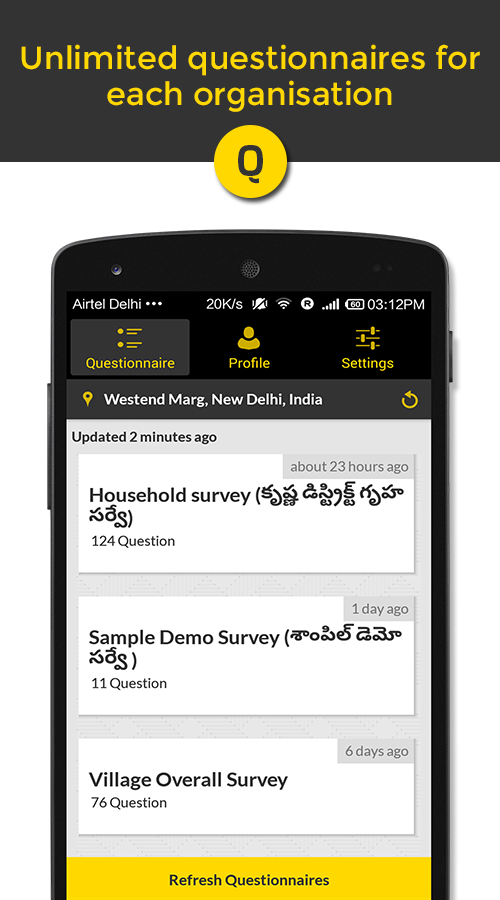

Above pictures: I started to have a look at existing applications within the google play folder, which is for the same format for my device that I want to create the app for, as an android app. I have started to think about the layout for my application, I like the look of the layout above in the first application, I think that it is simplistic, could be an idea for how the buttons or boxes to fill out could be placed, adding the idea of a scroll for my application, everything is one page, create directions to let the viewer know that there is more information further down "Show More". I started to look at the types of elements that I wanted my application to consist of, had the idea of letting the user have the option to "Sign In", give them the chance to create their own bio and keep track of the forms that they fill out monthly, obviously I would like to have the group email as the default so that every time the group submit data, it will go through to the groups email, be able to keep a track of all the information. Other than the hints on the page, I would like to create some kind of progress bar for the top of the page, this would allow the user to check whether they have filled out all of the component parts, could explore the idea of having a notification pop up that puts an aster-ix next to the question/part of information that has either been missed or yet to be filled in.
I wanted to do some more research and practice with the colors that I wanted to use for my application, once I had fully created my form within jot-form, I started to tweak the colors, decided to use a similar color to that of the groups website "South West Peregrine Group".
Here is the example of the form that I have created using Jot-form for my application Idea, I now have the correct types of information that I want my users to be able to fill in, I have the idea that once this form has been filled in, I can create a default email which can have this information sent across too for record, the group have their own email address and so I shall choose this for the default email so that everyone in the group can keep a track of the data that has been submitted. The main section at the top will contain the initials of everyone within the group, making it easy to identify who has filled in the form, for example if "Luke Curno" filled in the form, I would pick from the drop down the choice that says LC and then it would be clear that I was the one who has submitted this information.


I started to think about the positioning for the logo, I helped to generate this website for the group, I am going to be using the South West Peregrine Group's logo which I have permissions to use from the groups google drive folder, the logo was created using a program called pages which is for MAC, I could however import the image and save it in Photoshop as a PSD file which would help when importing the file into Adobe Captivate.
 As you can see on the website, the logo is positioned directly in the middle of the page, to make my application in keeping with the website I think that I will position the logo in the center at the top of the page with a possible progress bar located underneath. I would like to have the name of the organisation positioned directly underneath the logo, clearly visible, use a bold font to make it stand out.
Ideas Generation
So far for this project I have designed a few ideas to base my application around, at first I had the idea of creating an application that could be used within a film production team; here was the main idea that I had, thinking about the apps usage, capabilities, the reasons as too why I wanted to create this app whilst thinking about the positives that it could have on workflow, time management, organisation etc.
I have a Nexus 5, Android phone. I will be making the application primarily for use on my android phone, I might decide if the App is a success to explore the possibility of creating an application that can be used on multiple platforms.
1st Page - Introduction to my ideas in place
Movie Maker Application Idea - My Main Idea
My inspiration for a mobile application has come about from the need to have a tool at hand to help with all of the needs encountered in the film production processes experienced on the BA Honors Film Production course that I am studying.
Since starting the course, we have been exposed to many different roles required to ensure that any project is well conceived, planned, executed and finally produced. Without all of these component parts and all of the people involved in the process, things can go quickly wrong, ideas be misinterpreted, or things overlooked.
It is also important from an editing and evaluation perspective to be able to refer back to original concepts and ideas to ensure that the final production meets the original objectives.
I have thought about how a Application may allow team members of a project share ideas, record their progress and save data and files to a specified location so as the project develops and grows all of this important information is at hand to other team members as and when required. Otherwise target dates easily get missed, important items overlooked and people are waiting on other people to send required files, all this can lead to a poorly executed project which could be very damaging in giving future work as well as giving yourself a bad name.
Therefore I would like to explore the idea of a Movie Maker Application , which could be a tool used from the start point of a project.
The apps Key Features should include
• Project name
• Team Members and Roles
• Concept / Idea / Task Overview
• Script (file upload and editor)
• Location Scouting (image database inc Geo tagging)
• Story board area
• Camera Angles
• Production Crew Notes , Sound clips - Voice recorder
• Database Area for Equipment and Lighting (tips, hints etc) date-able from learning experiences - what works best in what conditions)
The idea being that as the crew start to bring together their work, ideas and general information, this in turn can be uploaded to a central project storage area, for example a project held within Dropbox, Google Drive or Outlook - whatever the choice of the production company.
The App would be best utilized across Multi platform's of IO's, Android, Chrome - as most companies and their staff, would utilize a variety of mobile platform devices whilst on the move. And would rely on Camera and Satellite technology for recording certain data. The idea that I have in mind is that all of the information gathered can then be used and accessed by the crew at the varying point of production.
I proposed this app too the lecturer to see his opinions on my ideas generation for my chosen application, we spoke about the types of capabilities that I wanted to achieve that I had talked about in my initial plan, he told me that 80% of my application would be achievable including the Geo location, camera phone, storyboard, taking notes, project name, scripts, team members and their roles, however he said that I would need to see a developer if I wanted to achieve the idea of the app being accessed across multiple platforms i.e. google drive, outlook, Dropbox etc, he said that this simply wouldn't be achievable in the timescale that we have left to create this application, I thought it was fair enough, it was a bit upsetting that I would be unable to create what I wanted at first but perhaps I could create something with similar values, I started to research more into the type of apps that exist, could I create an application that could be accessed by multiple people from different locations, could I create an application to support the data work that I do outside of University.
Additional Idea - Functionality
Additional Idea - Functionality
I started to come up with the idea that the app could be used to store data, next I started to look into existing apps, most of the layouts were complicated, lots of buttons, different colors, however thinking about my app I want to make mine user friendly, using jot-form I can provide the user with hints as they hover over different parts of the application. I started to generate a form using jot-form which would consist of the information that I would like to portray within the interface for my application. I thought that by generating a simplistic form, I would be able to use this to show the lecturer what I wanted to achieve with my application, how I wanted the app to feel, work and look for the user, the fact that I wanted to provide hints to help people fill in the boxes, if filled out correctly this could create a form of data about a specific category, once lots of these forms have been filled out we could then compare or find out the difference in numbers over a period of time.
After further research and idea development I have decided that I want to create an application that can be used by people within a group, I want to provide a form or variety of buttons where people can log in their name, fill in data about a Peregrine Falcon (Bird of Prey), this would include information like the number of pairs at any given site, any information that I could relate back to recording Peregrines at lots of different sites in Devon and Cornwall. However, I would like to be able to use abbreviations as I don't want to give out the names of the places that the birds have been located for many reasons, don't want to list them.
A few existing layouts of apps that are used for Data Collecting
A few existing layouts of apps that are used for Data Collecting

Above pictures: I started to have a look at existing applications within the google play folder, which is for the same format for my device that I want to create the app for, as an android app. I have started to think about the layout for my application, I like the look of the layout above in the first application, I think that it is simplistic, could be an idea for how the buttons or boxes to fill out could be placed, adding the idea of a scroll for my application, everything is one page, create directions to let the viewer know that there is more information further down "Show More". I started to look at the types of elements that I wanted my application to consist of, had the idea of letting the user have the option to "Sign In", give them the chance to create their own bio and keep track of the forms that they fill out monthly, obviously I would like to have the group email as the default so that every time the group submit data, it will go through to the groups email, be able to keep a track of all the information. Other than the hints on the page, I would like to create some kind of progress bar for the top of the page, this would allow the user to check whether they have filled out all of the component parts, could explore the idea of having a notification pop up that puts an aster-ix next to the question/part of information that has either been missed or yet to be filled in.
I wanted to do some more research and practice with the colors that I wanted to use for my application, once I had fully created my form within jot-form, I started to tweak the colors, decided to use a similar color to that of the groups website "South West Peregrine Group".
Here is the example of the form that I have created using Jot-form for my application Idea, I now have the correct types of information that I want my users to be able to fill in, I have the idea that once this form has been filled in, I can create a default email which can have this information sent across too for record, the group have their own email address and so I shall choose this for the default email so that everyone in the group can keep a track of the data that has been submitted. The main section at the top will contain the initials of everyone within the group, making it easy to identify who has filled in the form, for example if "Luke Curno" filled in the form, I would pick from the drop down the choice that says LC and then it would be clear that I was the one who has submitted this information.


I started to think about the positioning for the logo, I helped to generate this website for the group, I am going to be using the South West Peregrine Group's logo which I have permissions to use from the groups google drive folder, the logo was created using a program called pages which is for MAC, I could however import the image and save it in Photoshop as a PSD file which would help when importing the file into Adobe Captivate.

Additional Ideas - I have been looking into the way that the app could function, thinking about the clicking process and what that could become in aid of. After looking at my creation from Jot Form I thought that the buttons worked really well that displayed Submit, Clear Form and Print Form.
Target Audience - My specific target audience would be aiming towards
Wednesday, February 17, 2016
Creating an app - IPhone/IPad/Android - 17th February
Wednesday 17th February 2016 Module: Creating an App Lecture: Martial Bugliolo
Introduction into App Design
Today we started of by being introduced to this module, what it would entail, he asked us to have a look at the brief in our own time, he explained that we would need to start off by working out the resolution for our phones, typing"What is my Screen Res" into google it came up with a website which once clicked showed the size of my android phone which was 360x640 (Nexus 5 Screen Size). Throughout this introductory lesson, we got to grips with the basics of layouts, button actions and the way to preview our ongoing app designs using a programme called Adobe captivate.
Towards the break everyone had managed to open adobe captivate, set the resolutions to match their personal phone, had created the front page for the applications that we were designing as well as creating 4 different slides for their application i.e front page, about, portfolio and the contact page. After the break we started to create text entry boxes where we were able to use variables to create our own passwords for the application as well as presenting an error that would come up if someone entered the name or password incorrectly.
I found this first lesson very interesting as I was able to learn the basics of creating an interface for my application, I took the time in the lesson to show my drafted plan for the application that I wanted to create, Martial said that he would very happy to help out and hopefully all of the features would be achievable, he liked the idea of the geo tagging for photographs but he wasn't sure whether I would be able to sync the photos or any files directly to google drive, so i may have too carry out my own research in order to create this.
Since the lesson, I have read through the brief again, making sure that I understand what will be required to evidence on my blog as well as the ideas, planning and the application itself. I thought that i may have already been ahead of the game though as I had already created a plan for my application, even if I don't use the plan I can then show my research and progress up too the final creation, the reasons to back up my decisions are clearly labelled in my research document which shall be uploaded onto my blog further through the sessions.
Introduction into App Design
Today we started of by being introduced to this module, what it would entail, he asked us to have a look at the brief in our own time, he explained that we would need to start off by working out the resolution for our phones, typing"What is my Screen Res" into google it came up with a website which once clicked showed the size of my android phone which was 360x640 (Nexus 5 Screen Size). Throughout this introductory lesson, we got to grips with the basics of layouts, button actions and the way to preview our ongoing app designs using a programme called Adobe captivate.
Towards the break everyone had managed to open adobe captivate, set the resolutions to match their personal phone, had created the front page for the applications that we were designing as well as creating 4 different slides for their application i.e front page, about, portfolio and the contact page. After the break we started to create text entry boxes where we were able to use variables to create our own passwords for the application as well as presenting an error that would come up if someone entered the name or password incorrectly.
I found this first lesson very interesting as I was able to learn the basics of creating an interface for my application, I took the time in the lesson to show my drafted plan for the application that I wanted to create, Martial said that he would very happy to help out and hopefully all of the features would be achievable, he liked the idea of the geo tagging for photographs but he wasn't sure whether I would be able to sync the photos or any files directly to google drive, so i may have too carry out my own research in order to create this.
Since the lesson, I have read through the brief again, making sure that I understand what will be required to evidence on my blog as well as the ideas, planning and the application itself. I thought that i may have already been ahead of the game though as I had already created a plan for my application, even if I don't use the plan I can then show my research and progress up too the final creation, the reasons to back up my decisions are clearly labelled in my research document which shall be uploaded onto my blog further through the sessions.
Subscribe to:
Posts (Atom)